
AD Pro Portfolio Grid · Professional portfolio grids for WordPress
See pricing
The portfolio plugin that shows off your work.
The WordPress portfolio plugin for creatives who refuse to compromise. AJAX filtering, pinned projects, full visual control — without touching a line of code.
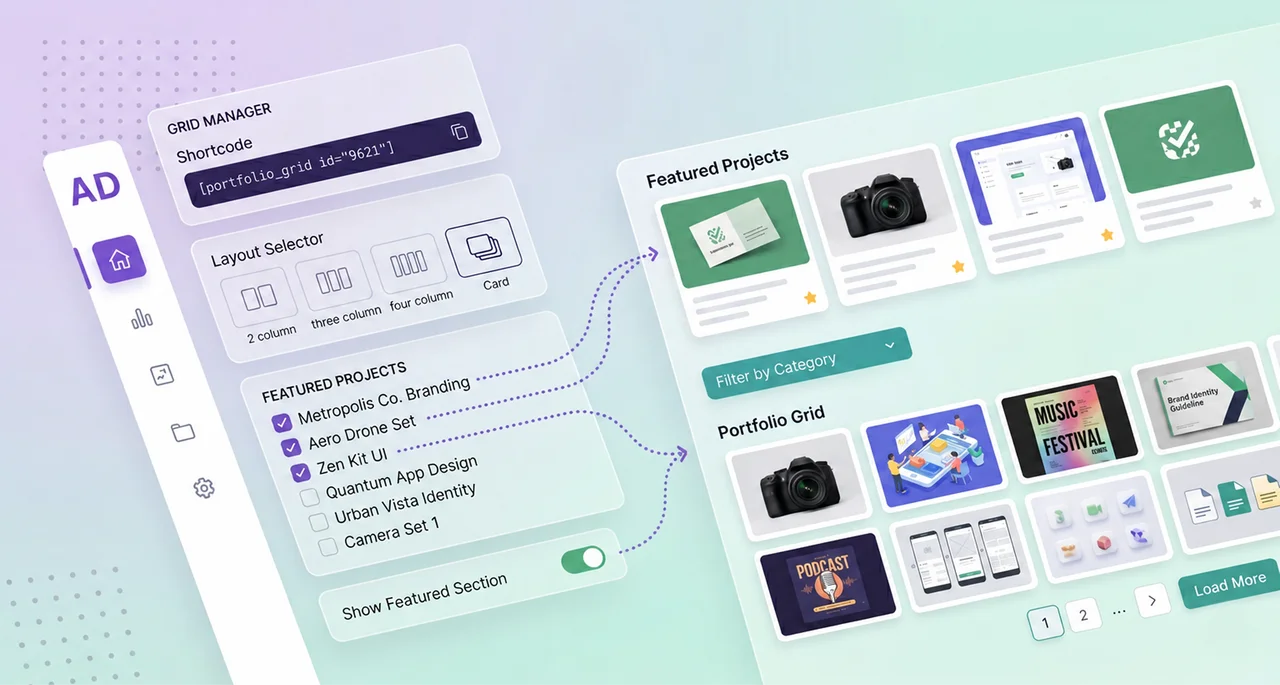
Built for real WordPress sites
I needed a WordPress portfolio plugin that did exactly what I wanted. I couldn't find one. So I built it.

Altay Dagistan
Brand designer & freelance art director
Paris
I'm a freelance brand designer and art director with over 15 years of experience. My WordPress portfolio is my main showcase. It's the first thing clients see, and it decides whether we end up working together or not.
Like most designers who use WordPress, I tried the existing solutions. They were either too simple, giving no visual control, or overengineered monsters dependent on an entire page builder. None of them let you choose exactly which projects show up first. None synced the filter state with the URL. None let you configure a different rendering depending on the context, without duplicating the whole setup.
AD Pro Portfolio Grid is the plugin I wish I'd found. It runs on my own WordPress site. Every feature exists because I needed it to present my work properly: AJAX filtering to move between categories with no reload, pinning projects to keep the most relevant ones at the top of the grid, per-grid overrides to adapt the rendering to each context without starting from scratch.
If you're a designer, developer or agency managing WordPress portfolios, this plugin was built with your real-world constraints in mind.
What sets it apart
Features most portfolio plugins don't have.
Four features you won't find in most WordPress portfolio plugins — or only in much more complex solutions.
Featured project pinning
Control exactly which projects show up first, independent of publish date or sort order. Type in the search field, select a project in one click, then drag and drop to reorder. Your best work at the top of the grid, page 1.
- Search by title and one-click selection. No ID, no slug, no guessing.
- Drag and drop to reorder pinned projects in the order you want.
- Two pinning behaviors: stays pinned with or without an active filter.
- Excluded from pagination count so page numbering is never thrown off.
- Per-grid control: different grids pin different projects.
AJAX filtering and pagination
Most portfolio plugins reload the page when filtering or changing pages. AD Pro does it with AJAX: instant, smooth, no flash. The grid updates in place, the URL stays in sync, and browser history works normally.
- No reload when filtering or paginating: the grid updates in place.
- Post count per term shown in the dropdown menu.
- Six sort orders, including random on every load.
- Smooth scroll to the grid when changing pages.
URL-based filtering
The filter state lives in the URL. Share a filtered view, bookmark it, or send a link straight to a category of projects. The grid opens with the right filter already active.
- Browser back and forward navigate between filter states.
- Send a client a direct link to their category of projects.
- Clean, readable URL parameter.
Full visual control
Colors, sizes, weights, radii, shadows and spacing configurable from the admin. No custom CSS, no child theme. Elementor and Bricks users will feel right at home.
- Typography: color, size, weight per element.
- Cards: background, border, drop shadow (X, Y, blur, spread).
- Buttons: text, background, hover color, border radius.
Features
Built by a designer, for designers.
Everything a designer needs to showcase their work on WordPress, in a single plugin.
Per-grid overrides
Set global defaults once. Override colors, typography, spacing, layout and behavior independently on each grid. One plugin, unlimited looks. No CSS, no child theme.
Clean admin interface
Most WordPress plugins look like abandoned government software. The grid builder is structured, labeled and responsive. Set up a grid in a few minutes.
Optimized performance
Native lazy loading on every image. Intersection Observer for mobile visibility. Cache-busting on AJAX requests. Tested with WP Rocket, LiteSpeed, W3TC and CloudFlare. The grid won't slow down your site.
Gutenberg + Shortcode
Insert any saved grid from the block editor via a dropdown. Or use the shortcode anywhere: classic editor, page builders, widgets. Every setting available as an inline attribute.
Three grid styles
Card, Overlay and Simple. Three distinct layouts covering most use cases: agencies, photographers, architects, freelancers. Mix styles across grids on the same site.
Theme-independent
Scoped CSS that doesn't interfere with your theme. Works with Blocksy, Astra, Kadence, GeneratePress, Hello, Bricks, Elementor and any block theme.
Preview
A look at the grid.
A static preview of the grid AD Pro Portfolio Grid generates, shown here with real projects from my own portfolio. Search, filters, and links are disabled in this preview.

Création de Sliders Instagram pour Hugo Décrypte / Elan
Editorial design, Digital, Art direction
This project involved creating Instagram sliders for the Elan account, an initiative by Hugo Travers (Hugo Décrypte).
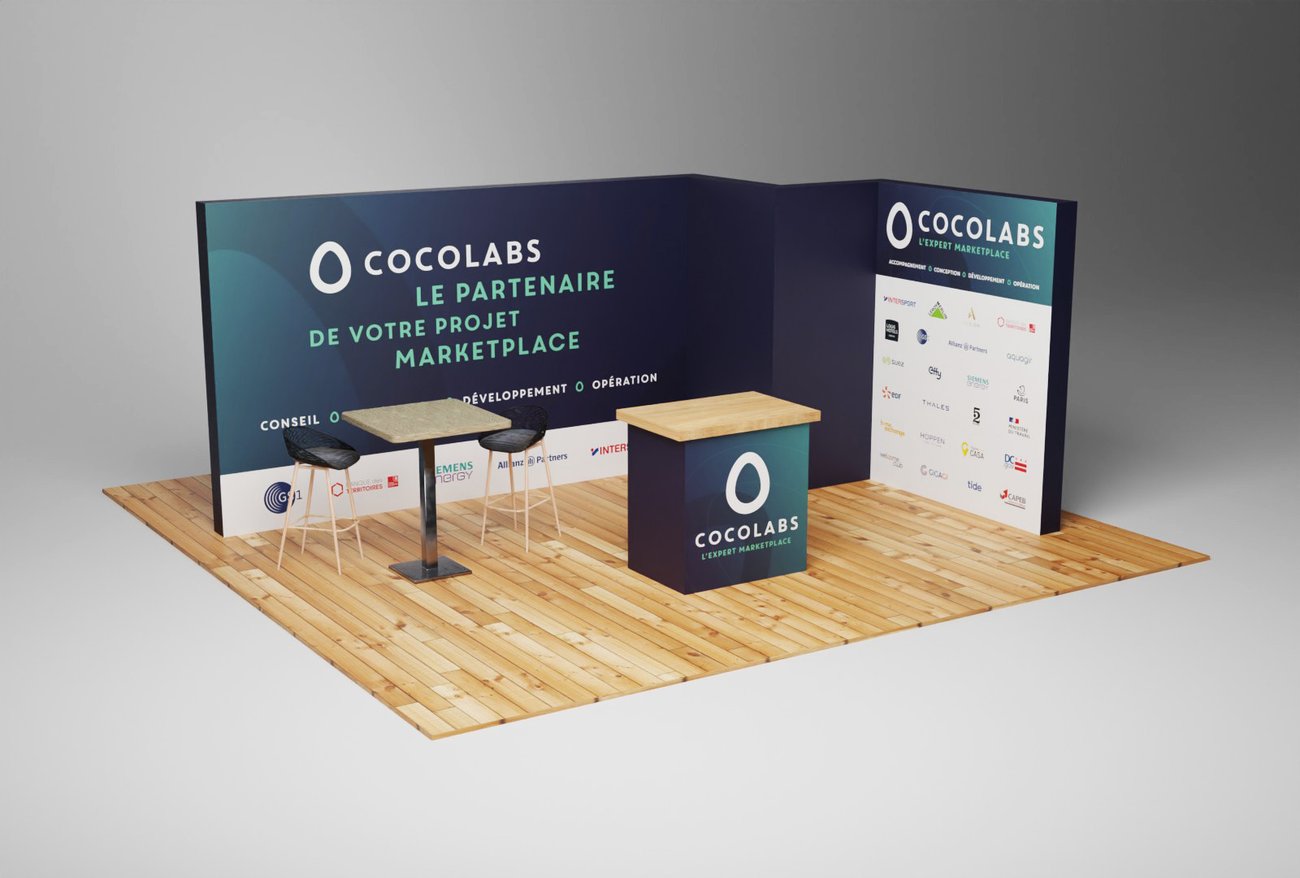
Habillage Stand Cocolabs – Tech for Retail
Stand & Roll-up
Booth design for Cocolabs at the "Tech for Retail" expo, the European trade show dedicated to retail technology innovation.
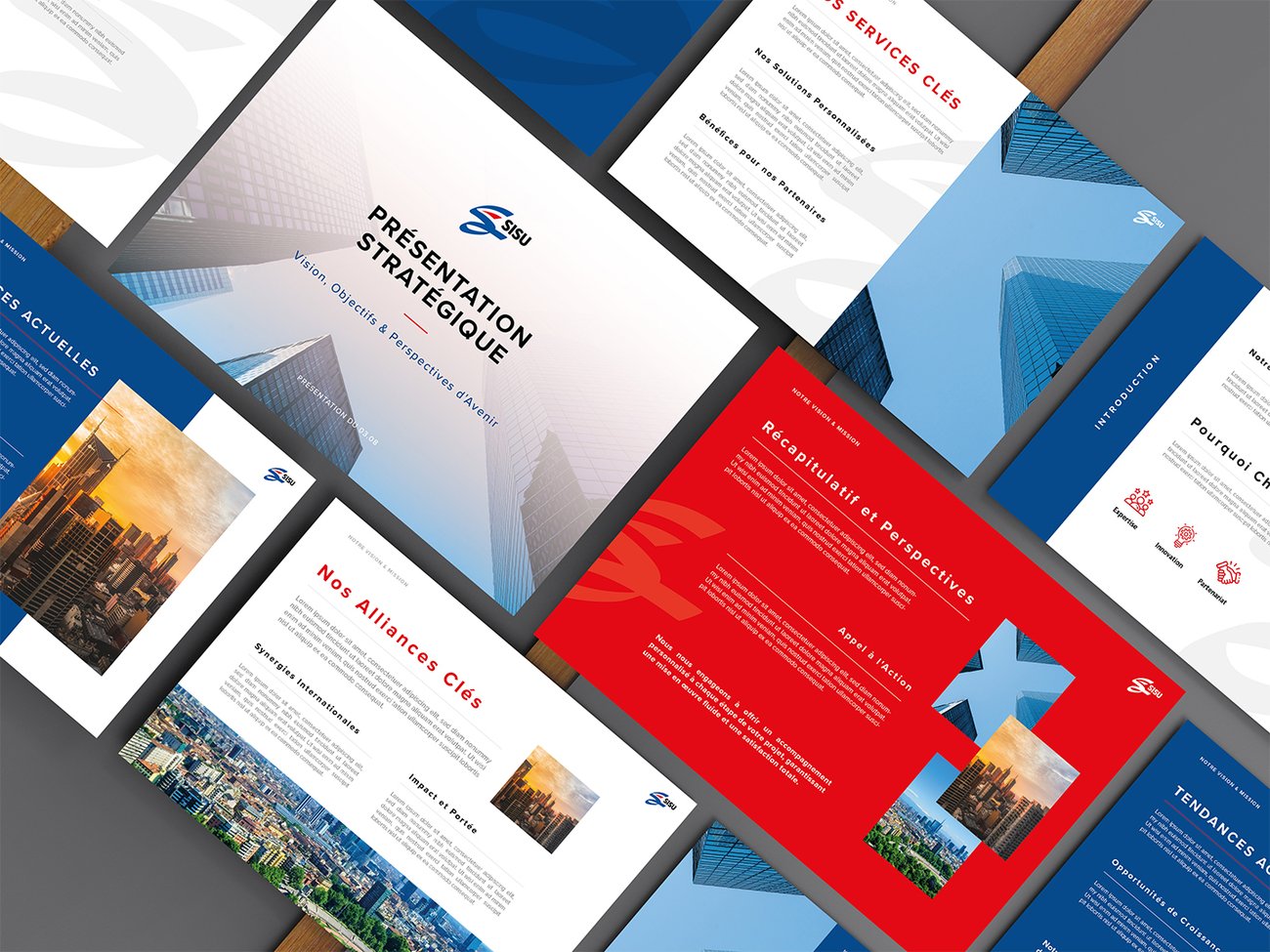
SISU — Design de pitch deck
Digital
Graphic design of a PowerPoint pitch deck for SISU — a clear, easily adaptable visual system.
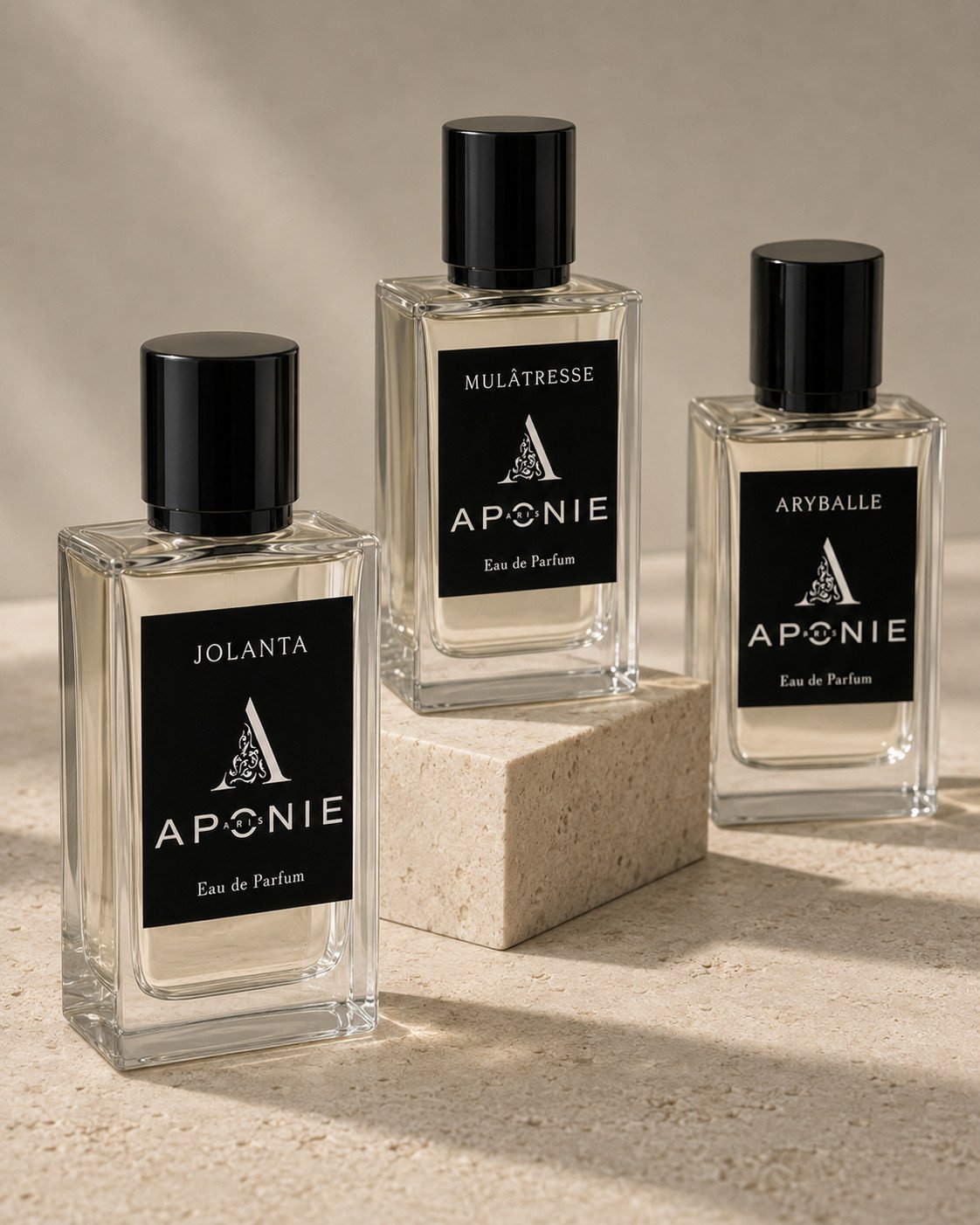
Aponie Paris — Design d’étiquettes de parfum
Print design
A set of labels for three Eau de Parfum fragrances: a sober, precious identity with deep black background and ornamental monogram.
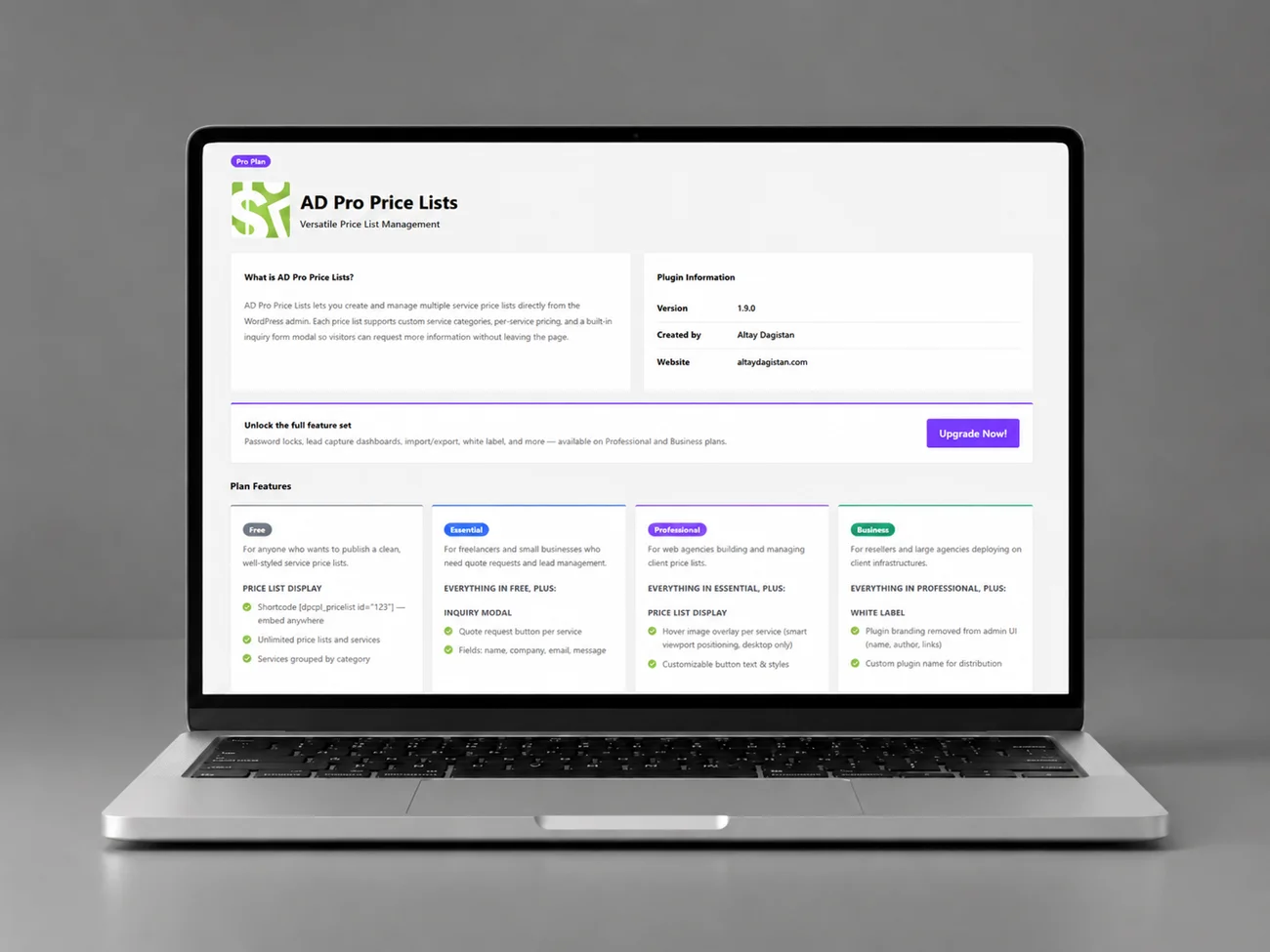
AD Pro Price Lists : Design UI/UX d’un plugin WordPress
UI/UX Design
UI/UX design for the AD Pro Price Lists WordPress plugin, a pricing grid management tool.

Carrousels LinkedIn et Instagram pour marques B2B
Art direction
LinkedIn and Instagram carousels for B2B brands — human art direction, AI-assisted iteration.
Complete feature list
Everything the plugin includes.
No surprises, no hidden settings. Every feature documented.
Grid styles
- Card: image on top, content below, customizable background and border
- Overlay: content overlaid on the image with white text
- Simple: image above the text, minimal style
- Hover animation: none, zoom or scale
- Image border: on/off, thickness, color (independently for Overlay and Simple)
Filtering
- Taxonomy-based dropdown filter
- Post count per term shown in the menu
- AJAX filtering: no page reload
- URL-based filtering with
?ad_filter=slug - Browser back/forward support via pushState
- Fully customizable filter dropdown
Pagination
- Numbered pages with previous/next
- AJAX: no page reload
- Smooth scroll to the grid when changing pages
- Pinned projects excluded from page count
- Fully customizable pagination visuals
Featured projects
- Search by title to select posts
- Drag and drop to reorder pinned projects
- Pinned at the top of page 1
- Behavior: filter-free only, or filter-aware
- Per grid: different grids pin different projects
- Excluded from pagination count
Typography
- Title: color, size, weight
- Category: color, size, weight
- Excerpt: color, size, weight, word count
- Mobile text alignment
- All overridable per grid
Card styling
- Background color
- Border: color, thickness, radius
- Drop shadow: color, opacity, X/Y offset, blur, spread
- Project count display: show/hide, custom suffix text
Button
- Customizable text
- Background, text and hover color
- Style: button or text link
- Size, weight, border radius
- Enable/disable per grid
- Open links in a new tab
Grid layout
- Column and row spacing
- Width type: full width or boxed
- Max width for boxed layout
- Posts per page, maximum post cap
- Sort order: date desc/asc, title asc/desc, menu order, random
- Elements to show: image, title, category, excerpt
Shortcode
[ad_pro_portfolio_grid id="1"]: load a saved grid- Every setting available as an inline attribute
- Works in the classic editor, page builders and widgets
- One-click shortcode copy from the grid manager
Gutenberg block
- Block:
ad-pro-portfolio-grid/portfolio-grid - Dropdown with all saved grids
- Server-side rendering
- Placeholder shown if no grid exists
Grid manager
- Lists every grid with shortcode, edit, duplicate, delete
- One-click grid duplication
- Global settings separated from per-grid configuration
- Dynamic loading of taxonomies and terms
Performance and compatibility
- Native lazy loading on every image
- Intersection Observer for mobile visibility
- Compatible with WP Rocket, LiteSpeed, W3TC, CloudFlare
- Cache-busting on every AJAX request
- Nonce verification on every endpoint
- Input sanitization and output escaping across the whole codebase
- CSRF protection via the WordPress nonce system
Pricing
Your work deserves to be well presented. The price follows.
Start for free. Pay once for a lifetime license, or annually if you prefer. All future updates included.
Essential
For a single site in production
- Everything in Free
- AJAX and URL filtering
- Open in a new tab
- Typography customization
- Layout and spacing customization
- Pagination style
- Filter style
- Email support
Professional
For freelancers and small agencies
- Everything in Essential
- Card, Overlay and Simple styles
- All sort orders (including random)
- Featured projects (2 behaviors)
- Per-grid overrides
- Custom excerpt length
- Gutenberg block
- Standard email support
For studios managing client sites
- Everything in Professional
- White label
- Remove plugin branding
- Priority email support
7-day money-back guarantee on all paid plans. Secure payment via Freemius.
Full comparison
What's included in each plan.
| Feature | Free | Essential | Professional | Agency |
|---|---|---|---|---|
| Unlimited grids | ✓ | ✓ | ✓ | ✓ |
| All content types (CPT) | ✓ | ✓ | ✓ | ✓ |
| AJAX pagination | ✓ | ✓ | ✓ | ✓ |
| AJAX and URL filtering | — | ✓ | ✓ | ✓ |
| Typography and layout customization | — | ✓ | ✓ | ✓ |
| Pagination and filter style | — | ✓ | ✓ | ✓ |
| Card, Overlay and Simple styles | — | — | ✓ | ✓ |
| All sort orders (including random) | — | — | ✓ | ✓ |
| Featured projects (2 behaviors) | — | — | ✓ | ✓ |
| Per-grid overrides | — | — | ✓ | ✓ |
| Gutenberg block | — | — | ✓ | ✓ |
| White label | — | — | — | ✓ |
| Support | Community | Standard email | Priority | |
| Sites included | Unlimited | 1 | 10 | 100 |
FAQ
Common questions before buying.
Yes. The plugin is theme-independent and uses scoped CSS that doesn't interfere with your theme's styles. Tested with Blocksy, Astra, Kadence, GeneratePress, Hello, Twenty Twenty-Four and others.
Yes, on every plan including Free. Any registered public post type works, with its associated taxonomy. The plugin automatically detects taxonomies when you select a post type in the grid editor.
Two ways. Copy the shortcode [ad_pro_portfolio_grid id="1"] from the grid manager and paste it anywhere. Or use the Gutenberg block (Professional plan and above) to insert a saved grid from the block library.
Annual licenses renew each year and include support and updates. Lifetime is a one-time payment that gives you access to the same features and all future updates forever. It pays for itself in three to four years.
Yes. Upgrade to a higher plan at any time, only paying the difference. Your grids and settings are preserved during the upgrade.
7-day money-back guarantee on all paid plans. If the plugin doesn't fit your needs, request a refund through Freemius and you'll get the full amount back.
Yes. The plugin sends no-cache headers on AJAX endpoints and uses cache-busting timestamps. Tested with WP Rocket, LiteSpeed Cache, W3 Total Cache and CloudFlare.
A better portfolio grid, starting today.
Install the free version from WordPress.org, build your first grid in five minutes, upgrade to a paid plan when you need full filtering and the complete toolkit.
Let's talk about your project
Launching something new, refreshing your brand or evolving your website?
Tell me about your context, goals and constraints — I'll get back to you personally.
15+
years of experience
500+
projects completed
100+
clients served